
AMDのハードウェアに最適化されたローカルAI環境ツール『Lemonade』で、StableDiffusionをROCmで実行する際にsd-server.exeのシステムエラーが発生した際の対処備忘録。
基本情報
環境情報
- OS:Windows 11 Home
- CPU:AMD Ryzen 7 5700X
- GPU:AMD Radeon RX 9060 XT (16 GB)
- Lemonade:v10.4.0
- 時期:2026年5月
StableDiffusionのモデル『Flux-2-Klein-4B』や『SDXL-Turbo』を実行すると以下のようなエラーが表示された。
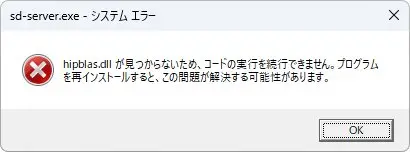
sd-server.exe - システム エラー
hipblas.dllが見つからないため、コードの実行を継続できません。プログラムを再インストールすると、この問題が解決する可能性があります。
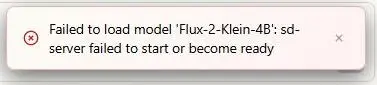
Failed to load model 'Flux-2-Klein-4B': sd-server failed to start or become ready
ログは以下のようになっていた。
2026-05-11 07:11:03.410 [Info] (Server) Ensuring model loaded: SDXL-Turbo
2026-05-11 07:11:03.411 [Info] (SDServer) Loading model: SDXL-Turbo
2026-05-11 07:11:03.412 [Info] (SDServer) Starting server on port 8001 (backend: rocm)
2026-05-11 07:11:03.412 [Info] (SDServer) ROCm backend: added C:\Users\ユーザー名\.cache\lemonade\bin\sd-cpp\rocm-preview to PATH
2026-05-11 07:11:03.455 [Info] (SDServer) Process started with PID: 15436
2026-05-11 07:11:07.914 [Info] (SDServer) Stopping server (PID: 15436)
2026-05-11 07:11:07.914 [Warn] (Router) Load failed with non-file-not-found error, evicting all models and retrying...
2026-05-11 07:11:07.914 [Info] (Router) Evicting all models (0 total)
2026-05-11 07:11:07.914 [Info] (Router) All models evicted
2026-05-11 07:11:07.914 [Info] (SDServer) Loading model: SDXL-Turbo
2026-05-11 07:11:07.915 [Info] (SDServer) Starting server on port 8001 (backend: rocm)
2026-05-11 07:11:07.915 [Info] (SDServer) ROCm backend: added C:\Users\ユーザー名\.cache\lemonade\bin\sd-cpp\rocm-preview to PATH
2026-05-11 07:11:07.919 [Info] (SDServer) Process started with PID: 10516
2026-05-11 07:11:11.268 [Info] (SDServer) Stopping server (PID: 10516)
対処
先に結論。config.jsonの”rocm_channel”を”preview”から”stable”に変更することで正常に動作するようになった。
概要
- Lemonadeを終了する(Quit Lemonade)
- config.jsonを編集する
- “rocm_channel”を”preview”から”stable”に変更
- Lemonadeを起動してStableDiffusionの適当なモデルで画像生成を実行する(stable版が自動でダウンロードされる)
config.jsonの場所
Windows版Lemonadeでインストール先がデフォルトの場合、config.jsonの場所は以下のとおり。
%USERPROFILE%\.cache\lemonade\config.json
“preview”から”stable”に
config.json内の”rocm_channel”を検索して、
"rocm_channel": "preview",
を
"rocm_channel": "stable",
に変更する。
画像を生成する
StableDiffusionで適当に画像生成を実行すると以下のフォルダ
%USERPROFILE%\.cache\lemonade\bin\sd-cpp
に、自動でrocm-stableフォルダが作成&必要なファイルがダウンロードされて、画像が生成される。

補足
再ダウンロード(再インストール)では改善せず
rocm-previewフォルダを削除して再ダウンロード(再インストール)してみても、 “rocm_channel”: “preview”ではエラーが発生した。
Lemonade自体のアンインストール→再インストールも効果がなかった。
GPUドライバの再インストールも効果なかった
DDUでアンインストール→AMD Software: Adrenalin Editionを再インストールでも改善しなかった。
参考

Lemonade Server Configuration
Lemonade helps users discover and run local AI apps by serving optimized LLMs right from their own GPUs and NPUs. Join o...
lemonade-server.ai

llama.cpp Backend Options
Lemonade helps users discover and run local AI apps by serving optimized LLMs right from their own GPUs and NPUs. Join o...
lemonade-server.ai
sd-server broken ?? Issue #1847 ?? lemonade-sdk/lemonade
Platform Windows Lemonade Version 10.3.0 GPU / APU Model AMD Radeon RX 9060 XT Component stable-diffusion.cpp Bug Descri...
github.com


コメント一覧